Why you should see a design on yourself
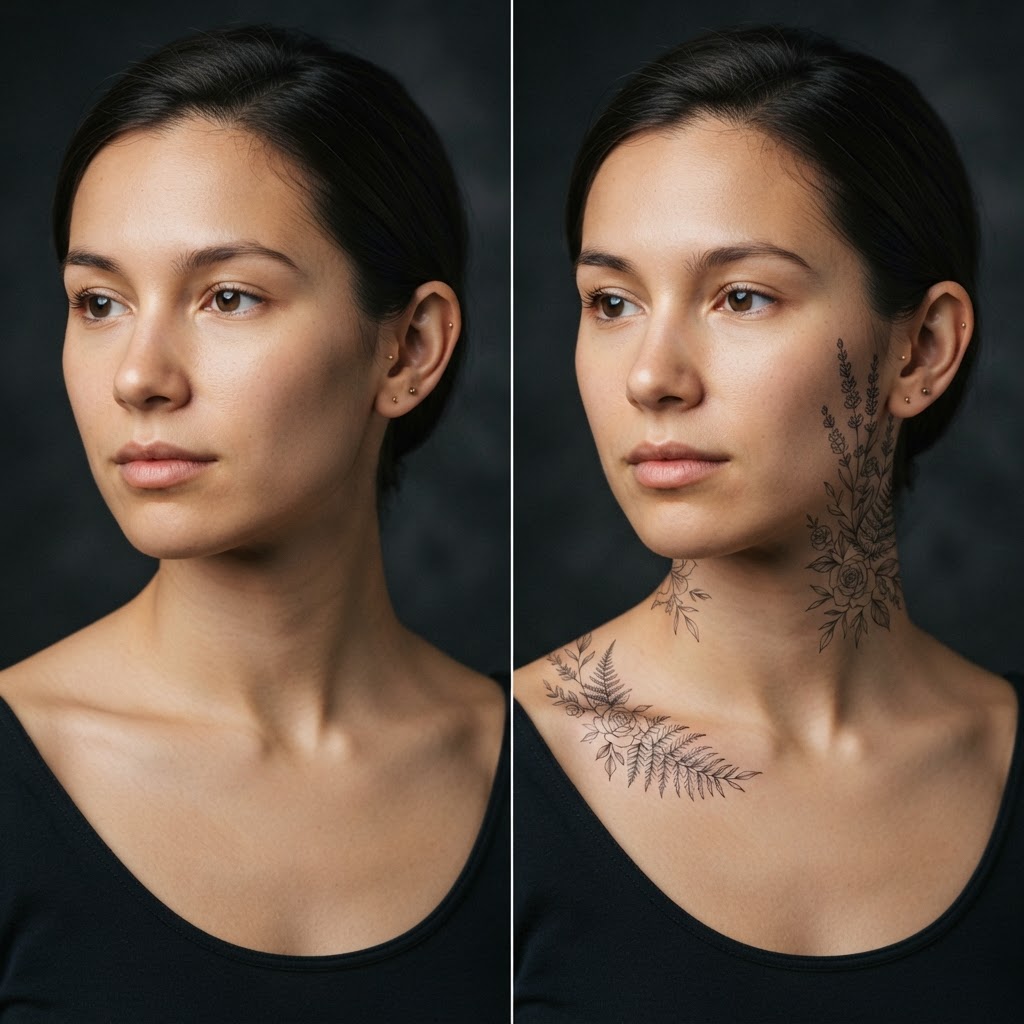
The same motif looks different on a flat arm and a muscular one, different on fair and darker skin, different as a minimal line and as a shaded piece. A preview on your own photo answers what no moodboard can: does the design fit the proportions of this exact body part?
You can also check the scale — “small” tattoos on Pinterest are often bigger in real life. A preview on your photo lets you match the size to the spot.
Which tattoo styles you can try
The catalog covers fine line style — thin geometric strokes — botanical motifs (flowers, branches, ferns), symbols, lettering, and larger pieces for the arm and forearm. There is also a “first tattoo” category: small designs for the ear, wrist and collarbone.
Each effect is generated on your photo, with realistic shadow and skin texture — so the preview looks like it came from a studio portfolio, not a sticker album.
What to do once you choose a design
Send the generated photo to your tattoo artist as a reference: they will see how the design sits on your anatomy and suggest corrections — line weight, placement, size. It is a much easier conversation than handing over a random picture from the internet.
And if the preview puts you off — that is a win too: you just saved years (and skin). A design is always easy to try again, in another version, on another spot.