All about TattoosBehind-the-ear and collarbone tattoos — preview first
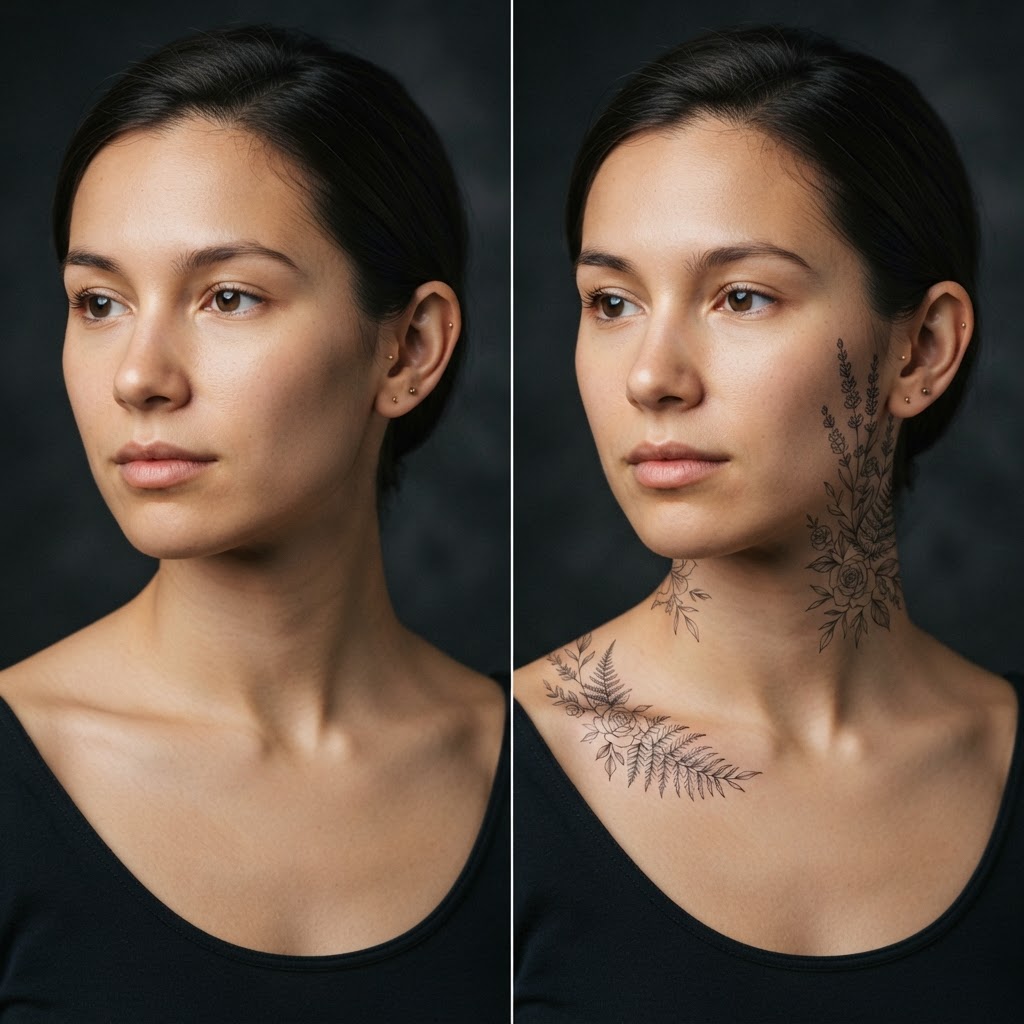
Behind the ear and the collarbone are the most popular spots for a first tattoo: discreet, easy to cover with hair or a collar, and still striking. The catch: a Pinterest design sits on someone else’s skin. In FaceMorph you transfer it onto your photo and see it on your ear and collarbone.
Try it on your photo20 free generations, no card requiredWhy these spots are so popular
Behind-the-ear tattoos have an elegant, minimalist character — tiny strokes: a star, a heart, an initial, a fern. They look great with hair down (as a surprise) and with a ponytail. The collarbone, in turn, gives a “frame” for horizontal motifs: lettering, lines, flowers.
Both spots hurt moderately — more than the arm, less than the ribs — and heal quickly. That makes them a frequent first choice, and a first choice deserves a preview.
What to check before your first tattoo
Scale: “tiny” designs on Pinterest are often bigger than you think; a preview on your own photo lets you match the size to the spot. Shape: the collarbone is not flat — the tattoo line must follow the anatomy or it “breaks” over the bone.
Also check the style: fine line (thin, geometric strokes) is the best fit for these areas — thicker, shaded motifs blur easily at small sizes. The preview shows the difference in readability.
How to preview the tattoo in FaceMorph
Upload a portrait with your ear or collarbone visible (a profile or half-profile works best), pick an effect from the tattoo category and generate the variant. You see the design on your skin — with shadow and perspective.
You can send that photo to the studio as a reference: the artist will advise on size and line-weight corrections. First 20 generations free, no card.